
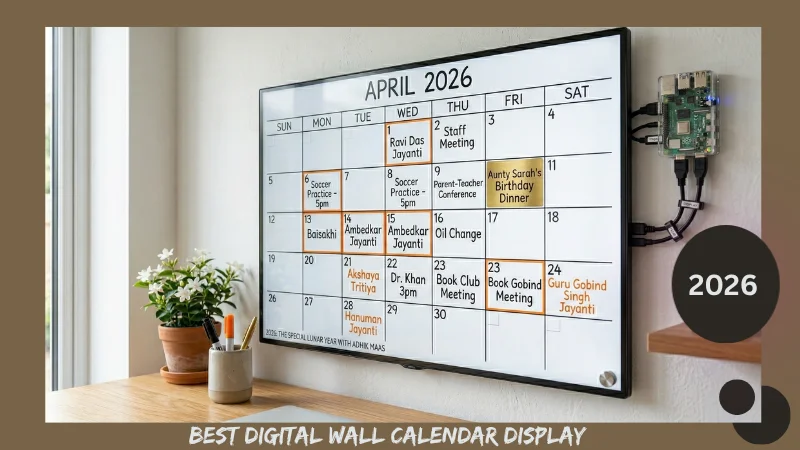
RASPBERRY PI GOOGLE CALENDAR DISPLAY: BUILD OR BUY A SMART DIGITAL WALL CALENDAR
A Raspberry Pi Google Calendar display is exactly what it sounds like: a screen on your wall that shows your calendar, always on, always current, always synchronised. No unlocking a phone. No opening an app. You walk past the wall, you know what today holds. That’s it.
The idea sounds almost too simple to be worth building. Then you have children, or a household with four schedules, or a family split across two continents — some in Chicago, some in Mumbai — and suddenly a screen that everyone can see simultaneously becomes the most useful object in the house.
This guide covers every option in the digital smart wall calendar category for 2026: the DIY Raspberry Pi route for people who want full control, the purpose-built commercial displays like DAKboard and Skylight for people who want to plug and plan, and a section that no other guide in this category has written — how Indian diaspora families in the US and UK are using always-on digital displays to track both Gregorian and Hindi calendar systems simultaneously, across time zones.

WHY AN ALWAYS-ON DIGITAL CALENDAR DISPLAY WORKS DIFFERENTLY THAN AN APP
Your phone calendar app is technically available always. In practice, it’s available when you remember to check it — which is whenever it already interrupts you with a notification, or whenever you already have your phone in your hand for something else.
A wall-mounted digital calendar display removes that friction entirely. It occupies peripheral vision. You absorb information about your week the way you absorb information about the weather outside — passively, continuously, without effort.
- Research from the Human-Computer Interaction community (specifically work by Mynatt et al. on “digital family portraits” and ambient display design, published in the CHI conference proceedings over several years beginning 2001 and updated in applied form through the 2020s) has consistently shown that ambient displays — screens designed to be seen rather than actively consulted — increase household coordination and reduce missed commitments without requiring behaviour change from the people they serve. The information comes to you. You don’t go to the information.
That is the fundamental case for a Raspberry Pi Google Calendar display or any always-on digital calendar, and it’s why this product category has grown steadily even as phone calendars have become more capable.
THE DIY ROUTE: RASPBERRY PI GOOGLE CALENDAR DISPLAY EXPLAINED
The Raspberry Pi Google Calendar display is a project built by home automation enthusiasts that has been refined over roughly ten years into something genuinely polished and accessible. Here is what it involves and what it actually takes to set up correctly.
The Hardware
A Raspberry Pi 4 (the current standard) or Raspberry Pi Zero 2W (for a lower-power, smaller installation) connects via HDMI to any monitor or display. The Pi sits behind the screen, invisible, running continuously. Power consumption is negligible — a Pi Zero 2W draws approximately 1.5 watts in active use, costing under fifty cents per month in electricity at US average rates.
The display can be any HDMI monitor. For a wall-mounted installation, a thin LED panel in 24-inch to 32-inch size gives excellent calendar visibility at room distance. For a bedroom or home office, a smaller 15-inch or 21-inch panel is adequate. The full setup including Pi hardware, monitor, and a basic enclosure runs between $80 and $200 depending on display quality — substantially less than a commercial Skylight Calendar or DAKboard screen at similar sizes.
The Software
The most widely used software framework for a Raspberry Pi calendar dashboard is MagicMirror² — an open-source platform originally created by Michael Teeuw in 2016 that has been maintained and expanded by a community of contributors ever since. As of 2025, MagicMirror² has over 800 community-built modules available, covering Google Calendar integration, weather, news feeds, commute time, transit schedules, and dozens of other data sources.
Google Calendar on Raspberry Pi integration through MagicMirror² requires an API key from Google Cloud Console — a process that takes approximately 20 minutes for someone comfortable with web services. Once configured, the display pulls calendar events directly and updates in real time. Any change made on Google Calendar from any device appears on the wall display within seconds.
DAKboard — a web-based dashboard platform designed specifically for Raspberry Pi display use — offers a simpler setup path for anyone who doesn’t want to work with MagicMirror² modules. DAKboard’s free tier covers Google Calendar integration and a clean visual calendar layout. The paid tier at $6-10/month adds family sharing, additional widgets, and premium layout customisation. A DIY DAKboard alternative built on free tools is possible but requires more configuration time.
E-Ink Displays: The Low-Power Alternative
The e-ink wall calendar is a different product philosophy entirely. Rather than a backlit screen always displaying full colour, an e-ink display refreshes slowly — like an electronic book reader — and consumes almost no power in static mode. The display shows the current calendar view continuously with negligible electricity draw.
The trade-off is refresh speed: e-ink calendars typically update every few minutes rather than in real time, and the display is monochrome or limited colour. They also tend to be smaller — 7.5 inch to 13.3 inch panels are the current practical maximum for affordable e-ink displays. For a calendar widget rather than a full household planning display, e-ink is an elegant low-power solution. For a family hub with multiple schedules visible at once, the screen size limitation makes it impractical.
BUYING COMMERCIAL: DAKBOARD VS SKYLIGHT — A GENUINELY HONEST COMPARISON
The two dominant commercial digital calendar displays on the market in 2026 are DAKboard (as a software platform running on your own hardware) and the Skylight Calendar (a dedicated hardware device with built-in software). They have completely different philosophies and different ideal users.

DAKboard
DAKboard is primarily a software product that turns any screen — a Raspberry Pi display, an old tablet, an Amazon Fire tablet in wall-mount mode — into a family information hub. The dashboard is customisable with widgets for calendar, weather, news, photos, and to-do lists. It syncs with Google Calendar, Apple Calendar, Outlook, and most other calendar platforms.
The limitation is setup complexity. DAKboard is not a plug-and-play product. Getting it onto a Raspberry Pi calendar installation requires comfortable command-line interaction. Getting it onto a repurposed tablet is simpler — download the app, enter credentials, position the tablet — but the tablet still needs to be physically mounted and powered permanently.
The free version is functional and genuinely usable. The paid tier adds multi-user family sharing and priority support. DAKboard runs in a browser, which means any device with a browser and an HDMI output can become a DAKboard display. This flexibility is its greatest strength.
Skylight Calendar
The Skylight Calendar is a hardware device: a dedicated 15-inch or 10-inch touchscreen display designed specifically to be a shared family calendar. It runs its own operating system, syncs with Google Calendar and Apple Calendar, and can be updated by any family member from any device. Photos display in slideshow mode between calendar views.
Setup is genuinely fifteen minutes from unboxing to operational. For anyone without programming comfort or time for configuration, this is the advantage that justifies the $160-200 price tag. Skylight dimensions are 15.1 x 8.8 inches for the standard model and 13 x 8 inches for the smaller version — both sized for a kitchen counter or a bedside table rather than a true wall display.
The Skylight calendar dupe question comes up frequently in buyer searches — is there a cheaper alternative to Skylight Calendar that does the same thing? The honest answer is yes, but it requires DIY tolerance.
A repurposed Fire HD 10 tablet ($100) running DAKboard or Google Calendar in kiosk mode with a wall mount bracket ($15) achieves comparable functionality at approximately half the cost. The trade-off is setup time and the fact that Fire tablets occasionally need attention (updates, reboots) that a Skylight never does.
Hearth Display vs Skylight
The Hearth Display is a newer commercial competitor to Skylight positioned at a similar price. Its differentiator is deeper smart home integration — Hearth connects to Alexa, Google Home, and other smart home platforms more natively than Skylight. For households already running home automation, Hearth’s ability to show who’s home, what’s playing, and who set which reminders gives it a practical advantage over Skylight’s more calendar-focused approach.
For purely calendar-and-scheduling use, Skylight has the more refined interface. For households where the calendar display is part of a broader smart home system, Hearth is the more thoughtful choice.
THE DIGITAL CALENDAR AND HINDI TIME: A USE CASE NO COMMERCIAL PRODUCT HAS ADDRESSED

Here is the reality for millions of Indian households in the United States, United Kingdom, Canada, and Australia: the family in Chicago or London is running on Gregorian time at work and school. The grandparents calling from Delhi or Ahmedabad are running on the Hindi lunar calendar — scheduling calls around puja days, asking about festival preparations in the context of the current Hindi month, referencing Tithi dates that mean nothing without a Panchang.
A Raspberry Pi Google Calendar display can bridge this gap in a way no commercial product currently does out of the box.
The method is direct: create a separate Google Calendar — call it “Hindi Calendar 2026” — and manually enter the 13 Hindi month start dates and major festival dates as all-day events. This calendar then syncs to your Raspberry Pi display or DAKboard wall display alongside your regular schedule, showing Hindi month transitions and festival dates in a different colour at the top of each day view.
For 2026 specifically, this integration matters more than in any recent year. The Hindi calendar in 2026 has 13 months, not 12. The extra month — Adhik Jyeshtha — runs from May 17 to June 15. Festival dates after May shift relative to their 2025 positions.
A digital display that shows “Adhik Maas begins” on May 17 and “Raksha Bandhan — Shravana Purnima” on August 28 gives every family member in the house continuous context for why festival preparations begin when they do.
The complete list of all 2026 Hindi month start dates and festival timings, formatted for manual entry into Google Calendar or any calendar application, is available at monthnameshindi.com on the Hindi Calendar 2026 page. The format is date-by-date, ready to enter as-is.
For grandparents calling across time zones, a digital calendar display that visibly includes Hindi month context also changes the nature of those conversations. “We can see Shravan starts August 13 — we know that’s when you start the fasts” is a different kind of connection than explaining it from memory each time.
DIGITAL WALL CALENDAR SETUP RECOMMENDATION
Not every household needs the same solution. Here is a straightforward guide:
For a single person or couple comfortable with DIY and already using Google Calendar: Raspberry Pi 4 + 24-inch monitor + MagicMirror² with Google Calendar module. Total cost: $120-170. Setup time: 3-4 hours.
For a family of three or more who want something working today without technical setup: Skylight Calendar on a kitchen counter, Google Calendar sync configured from a phone. Total cost: $160-200. Setup time: 15 minutes.
For a family already using smart home devices (Alexa, Google Home): Hearth Display as a wall-mounted panel, integrated with existing automation. Total cost: $150-200. Setup time: 30 minutes.
For a household tracking both Gregorian and Hindi calendars who want the most visual flexibility: DAKboard on a repurposed large tablet or a 32-inch wall-mounted display, with a dedicated Hindi Calendar 2026 Google Calendar feeding into the display alongside the main family calendar. Total cost: $80-150 for hardware plus optional $6-10/month for DAKboard pro. Setup time: 2-3 hours.
CLOSING: THE WALL THAT KNOWS WHAT DAY IT IS
There is something quietly profound about a home where the calendar doesn’t require anyone to check it. Where the wall simply knows what day it is, who has what commitment, when the next festival begins, and whether school is on.
A Raspberry Pi Google Calendar display, a DAKboard setup, a Skylight on the kitchen counter — these are not high-tech gadgets. They are infrastructure. The kind of quiet, reliable infrastructure that makes a household feel organised rather than reactive.
For Indian diaspora families specifically, a digital calendar display that carries both systems — Gregorian time and Hindi lunar time, both visible, both current — closes a gap that has existed since the first generation moved abroad and started living in two calendars simultaneously. The technology to bridge those systems has existed for years. It just needs to be pointed at the right data, set up once, and left alone.
2026 is a 13-month Hindi year. It’s more complex to track than most. Put it on the wall where everyone can see it and stop explaining it from memory.
Related posts :
How Hindu Months Got Their Names: The Link to Nakshatras
Hemant Ritu: A Guide to the Indian Pre-Winter Season